 User-Guide · Dec 5th 2025 · 7 Min read
Zoho CRM Login: All You Need to Know. A Stepwise Guide in 2026
Zoho software has been in the news recently. The Zoho software suite offers a good business solution, ranging from Zoho Mail and Messenger to Zoho CRM. Likewise, Zoho CRM is the talk of the moment, gaining traction. The Zoho software suite offers convenient features and options for businesses of all types.
In this blog post, we will learn about the Zoho CRM login process, the steps to log in to Zoho CRM, and more. Let us get into the topic and cover more.
Step-by-Step Guide to Zoho CRM Login Process
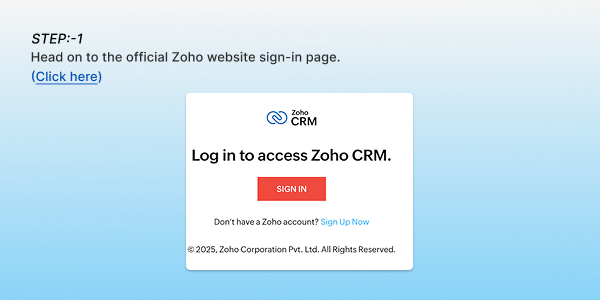
Step. 1: head on to the official Zoho website sign-in page. (Click here)
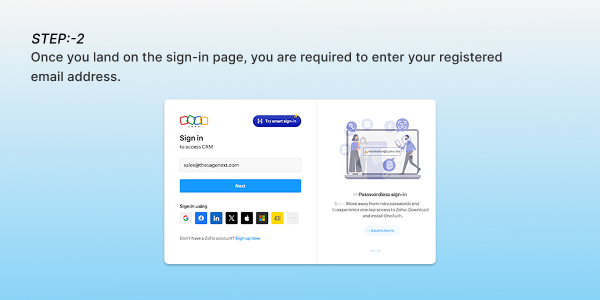
Step. 2: Once you land on the sign-in page, you are required to enter your registered email address.
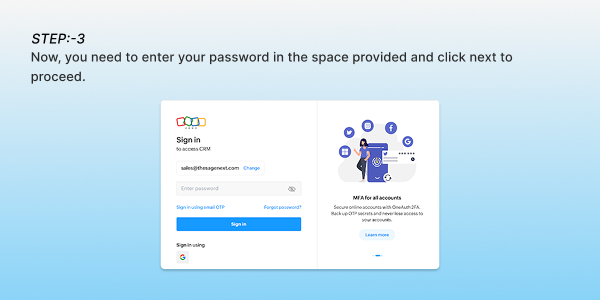
Step. 3: Now, you need to enter your password in the space provided and click next to proceed.
Step. 4: Once you are done entering your email and password, click the sign-in option to log in
Step. 5: Once you click the sign-in option, you enter your CRM dashboard, where you can start your work immediately. You have now successfully logged into your Zoho CRM software suite.
Facing Zoho CRM Login Issues? These Could Be the Reasons
| If you forgot your password, use the “Forgot password” link on the login page to reset it. |
| You may be unable to log in due to a region-specific error. If you see a region error, choose the correct region data center. Zoho has separate login portals for the US, EU, India, Australia, and China. |
| If you sign in to Zoho with Google, Microsoft, or another SSO provider, you can use that instead of entering your Zoho password. |
Conclusion
Zoho CRM login is not a challenging process. Once you have successfully registered with your email and password, signing up will just take a few minutes. We have provided a simple step-by-step guide to access your CRM dashboard through a simple login process. If you still struggle with the zoho crm login, you can reach out to our experts for guidance.
Also Read: What is Zoho Books? A Complete Guide 2025
FAQs (Frequently Asked Questions)
How to log in to Zoho CRM?
You can log in to Zoho CRM with the following step-by-step guide:
Go to the sign-in page > click on the sign-in option > enter your email address > enter your password to proceed next > and now you have successfully logged in to your Zoho CRM.