
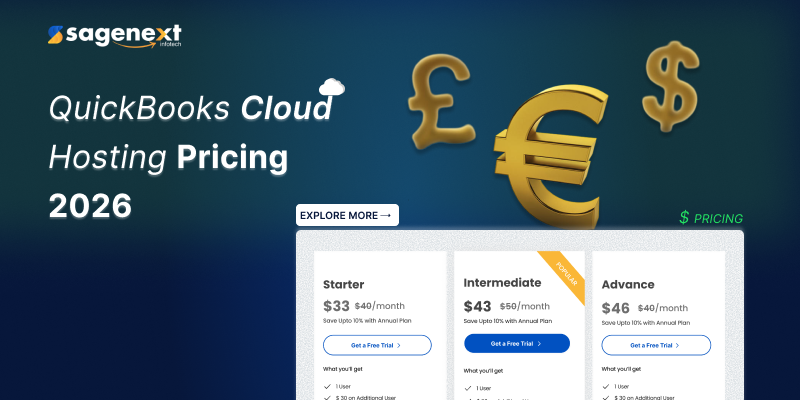
Your Complete Guide to QuickBooks Hosting Pricing for 2026
QuickBooks software is the primary financial management program used by millions of companies. However, when you shift from a desktop version to a cloud-hosted solution that is more flexible, the question comes up: how much will it be? Given that 81% of consumers include price as one of their top 3 factors in deciding on a purchase, learning the cost of QuickBooks cloud hosting would be wise as the initial step towards a scaled and long-lasting investment. This article unpacks the topic, giving a simple QuickBooks cloud hosting pricing breakdown by showing the factors driving the cost, the latest QuickBooks hosting price plans for 2026, and how you can pick a plan that will offer the greatest value to your business.
What Factors Influence Your QuickBooks Cloud Hosting Cost?
The cost of QuickBooks hosting isn’t the same for everyone. It gets figured out individually, depending on what a person uses a product for. Figuring out these things is a great way to get the most out of your investment.
QuickBooks Version & Licensing
The software version you are hosting is the biggest factor that determines the cost. Since Intuit has permanently stopped the Pro, Premier, and Accountant desktop versions, most companies nowadays only have two options: either to go for QuickBooks Enterprise for its powerful features and scalability or QuickBooks Online. The licenses of Enterprise are sold separately from hosting and are generally pricier because the software has more capabilities.
Number of Users
The majority of hosting providers will charge you on a per-user, per-month basis. This scalable pricing model affords you the convenience of adding or removing user licenses just as frequently as required, which is wonderful if your staff count varies with the seasons. Costs will rise more or less directly proportional to the size of your team; for instance, a 5-user setup might be priced at $95 to $120 a month, whereas a 20-user installation could run $350 to $450.
Resource Allocation (CPU & RAM)
The quantity of virtual CPU and memory you need is the main thing determining the level of service and its cost. A person who is a solo practitioner, maybe doing only the occasional bookkeeping, would probably need a much less resource-intensive setup; on the other hand, a global company that is running simultaneously different modules such as HR, finance, and supply would consume a lot more.
Storage Space
Every single one of your business-related files, such as data, images, and documents, will be put on the server of the service provider. The situation may change dramatically, and therefore differential storage plan offerings are not unusual (e.g., 10GB for $10/month; 50GB for $50/month). Consequently, the best way to avoid running out of your allocated amount (and penalty charges) later on is to anticipate your usage.
Backup & Disaster Recovery
Most vendors are already inclined to automated daily backup, which means that in case of any incident, you will be able to restore your information. However, if you are looking for such options such as point-in-time recovery or a geographically duplicated copy in a remote data center, then you will have to pay extra for these capabilities.
Security Protocol
The standard set of security tools (e.g. firewalls, encryption) is included in the package; on the other hand, if MFA (multi-factor authentication), dedicated IPs, or managed threat detection are among your safety measures, then assuming that these are generally add-ons but very helpful for minimizing the chances of financial hacks, you should still be prepared to pay for them.
Customer Support Levels
What level of support is included can have quite a substantial effect on the price. On one hand, email and ticket support at a low level will suffice for some, while others may require 24/7 phone assistance with an almost instant response, i.e., here within 5 minutes; accordingly, the cost of this service should be reflected in the plan.
- Add-on Services & Customizations: A basic report customization might be free of charge; however, thorough workflow automation, integration with other business apps (e.g., CRM, POS), tailored user interfaces, etc., will entail the hiring of professionals, thus increasing the total cost.
QuickBooks Hosting Pricing Plans: 2026 Overview
The following is a concise overview of QuickBooks hosting pricing plans that could be expected in 2026, extrapolated from the current market and provider product offerings. The table below shows popular plan tiers with their respective prices and features.
| Plan | Discounted Monthly Price (First Year) | Actual Monthly Price | Best For | Key Features |
| Simple Start | $19 | $38 | Sole proprietors, freelancers | 1 user, smart expense organizer, basic invoicing & reporting |
| Essential | $37.50 | $75 | Small teams (up to 3 users) | Automated bookkeeping, up to 5 ACH bank transfers/month, recurring invoicing |
| Plus | $57.50 | $115 | Growing businesses (up to 5 users) | AI-powered reconciliation (beta), profit & loss insights, robust budgeting, anomaly detection |
| Advanced | $137.50 | $275 | Larger enterprises (up to 25 users) | Custom report builder, revenue recognition, advanced forecasting, project management tools, Excel sync |
How to Choose the Right QuickBooks Hosting Plan
To get the most out of the QuickBooks hosting pricing scheme, it is advisable that you do it in a thoroughly planned manner. Below are five stages for you to think through:
Evaluate Your Requirements: Identify which QuickBooks functionalities you cannot do without, how many users will require access, and decide on storage and performance (CPU/RAM) capacities.
Make Security & Compliance Your Top Priority: If you happen to be in healthcare (HIPAA) or any other industry-regulated one, verify whether your provider’s security measures and compliance certifications are at par with the standards.
Consider the Real Total Cost: Apart from the base user fee, scrutiny, add-on storage, premium support, security upgrades, and backup retention duration charges, you won’t be surprised at the billing.
Demand Transparency: Select a provider who discloses their charges clearly and includes absolutely everything in the total with no hidden fees. A trustworthy host will furnish you with a breakdown of all cost components.
Give It a Test Before You Make a Commitment: You can take advantage of free trials. There is nothing like experiencing firsthand the performance, ease of use, and responsiveness of the support that you get from the hosted environment.
Why Choose Sagenext as Your QuickBooks Hosting Partner
As a provider of the latest cloud hosting technology, our price is reasonable and transparent. Our being a product expert certifies that you will also be worry-free in getting clear and reliable plans from us.
Affordable Gateway: We offer hosting services starting from $33 monthly, with fair competition with the typical market pricing levels.
Don’t Pay Without Testing: Up to one week trial time with no credit card requirement is offered to you in order to evaluate our software platform.
We Are Fully Committed to You: Our promise is a human response in 5 minutes plus 24/7 support so you never get stuck.
Enterprise-Grade Infrastructure: We ensure the 99.99% of server uptime, 256-bit SSL encryption, and operation out of SSAE-18 and HIPAA-compliant data centers thus your data is secure and accessible.
Great Savings: Your choice is our yearly subscription plan, whereby you are basically getting 15 months of service for the price of 12, hence a huge saving in the long run.
QuickBooks Hosting on Cloud with Free Trial
Summary: Making smart, scalable investments in accounting
Purchasing a QuickBooks cloud hosting plan is basically a double investment: in your company’s operational efficiency and also in its financial health security. When you contemplate the elements behind the charges for QuickBooks hosting 2026, you will not only be able to determine your financial deal but also get such vital ones as security, support, and scalability. Along the way, Sagenext can be your teammate, happily accompanied by transparent pricing, a power-packed infrastructure, and a knowledgeable finance operations team for years to come.
Are you ready to make the most of your accounting workflow? Quickly sign up for a free trial of your QuickBooks Sagenext cloud hosting and experience a cloud solution of the rock-solid kind.
Frequently Asked Questions (FAQ)
Q: What is QuickBooks cloud hosting?
A: QuickBooks cloud hosting is a service that enables your QuickBooks desktop software (such as Enterprise) to be used through the internet, anywhere. In a traditional setup, the software is typically installed locally on your computer, whereas in cloud hosting, both the software and data are stored on secure, high-performing servers at a data center. Consequently, this allows you to work with your applications from any location, on any device, and without being connected to a particular computer.
Q: How much does QuickBooks cloud hosting typically cost?
A: It can be observed from this QuickBooks Hosting Pricing Guide that the overall price varies depending on the plan features, the number of users, and the chosen add-ons. Plans that providers offer to their ordinary clients generally have a price range from $19 to $275 per month. The starting point of Sagenext’s pricing is $33 per month, and this price includes all the necessities without exception and without any extra charge.
Q: Are there any hidden fees in hosting pricing?
A: You won’t experience any hidden fees with a transparent provider like Sagenext. Honest hosts will always publish the level of charges for user licenses, storage levels, and any optional top-notch services (e.g., advanced security features) beforehand. Besides, don’t just take the supplier’s word; ask for a detailed quote.
Q: Can I try the service before purchasing?
A: Of course. Sagenext offers a 7-day free trial to get a sense of their services. This trial period does not require credit card information. The main idea here is that you get to test the performance of the services, the interface, and the support level firsthand before you make any financial commitments.
Q: What makes Sagenext different from other hosting providers?
A: Sagenext, with its steadfast value and trip-level support, is great among competitors. For example, a member of the support team will reply to your query well within 5 minutes, you can choose a billing option of 15 months for the price of 12, and the security standards of the enterprise are among others that set Sagenext apart, not to mention the latest transparent pricing model.
Start Saving with QuickBooks Cloud Hosting Today!
 Popular Posts




